


Azure DevOps vs GitHub: The Battle That’s Reshaping How We Build Software
Fact: As of January 2023, GitHub officially hosts over 100 million developers globally, making it the world’s largest developer platform. This milestone sets the stage for one of the most important comparisons in software development today: Azure DevOps vs GitHub.
A Tale of Two Platforms
Imagine you are a developer in 2025. You are balancing deadlines, delivering new features, and managing that one overlooked bug on your sprint board. Two prominent platforms are available to assist you: GitHub and Azure DevOps, both promising increased productivity, simplified workflows, and enhanced product quality.
One represents the vibrant open-source ecosystem, alive with community activity and innovation. The other embodies structured project management, deeply integrated into enterprise workflows. Both platforms are owned by Microsoft, yet comparisons continue to be made. This is where the evaluation becomes critical.
At GKM IT, we provide guidance to teams in selecting the most appropriate platform- whether it is the agility of GitHub, the structure and governance of Azure DevOps, or a combination of both to establish workflows that effectively meet business objectives.
Chapter One: GitHub – The Global Developer Hub
For any developer who has written code, interacting with a GitHub repository is almost inevitable. GitHub functions as a universal platform for developers, allowing teams to host projects, collaborate globally, and even deploy static sites via GitHub Pages.
GitHub is the home of open source. From individual developers pushing weekend projects to Fortune 500 companies managing production systems, GitHub is the environment where code lives and evolves. Beyond code storage, GitHub offers collaboration tools such as pull requests, code reviews, and CI/CD pipelines through GitHub Actions.
The platform also provides a social ecosystem that enables developers to learn, build, and demonstrate their skills. At GKM IT, we partner with organizations to leverage GitHub’s collaborative capabilities, optimize repositories, implement GitHub Work, and configure automations so that engineering teams can focus on development rather than troubleshooting.
Chapter Two: Azure DevOps – The Enterprise Engine
In contrast, Azure DevOps is a full command center for the structural, scalable, and observable delivery of software. Here are the main elements of Azure DevOps:
- Azure Repos: Provides secure and version controlled code.
- Azure Boards: Turns undefined project outcomes into defined work items and sprints.
- Azure Test Plans: Provides rigorous quality assurance prior to a release.
- Azure Pipelines: Provides a continuous delivery pipeline for building and deploying in .NET, Java, Node.js, and Python environments.
When constructing enterprise-grade solutions, Azure DevOps makes it easy to integrate with the additional Microsoft technologies, such as Azure Artifacts for your package management or Azure Monitor for your performance insights, so that teams can have the same coherent view of the software lifecycle. Here at GKM IT, we create, implement, and colour appropriate Azure DevOps solutions to match enterprises; we can integrate Boards, Pipelines, Artifacts, and Monitor into same cohesive ecosystem that will achieve fast and more reliably software releases.
Chapter Three: Where They Overlap
So here’s the twist: comparing GitHub and Azure DevOps isn’t like apples and oranges; it is more like two things out of the same toolbox.
They both allow you to store code. They both give you CI/CD capabilities. They both help you manage your projects. In fact, Microsoft owns both, and they are getting closer and closer together each and every year. You can link a GitHub repo to an Azure Pipelines build task, you can track issues from Azure Boards in GitHub, and you can push packages to Azure Artifacts from GitHub workflows.
This means that the decision depends more on “which is better” than it does on “which fits your culture and processes.”
GKM IT specializes in hybrid environments and unique solutions- combining GitHub and Azure DevOps so teams can achieve the best of both worlds – without any compromise in working efficiency or visibility.
Chapter Four: The GitHub vs GitLab Side Quest
It is also important to include GitLab in this conversation. The reason GitHub and GitLab are effective for project management, including repositories, CI/CD, and project management collaboration is that GitLab has a reputation of being a single application with one login, one interface, and one integrated solution.
GitHub is a highly extensible and sometimes friendlier tool, but organizations often use some combination of GitHub and GitLab because GitHub can integrate with tools like Azure DevOps to complete a full end-to-end workflow. This is why it’s not enough to consolidate to GitHub or GitLab; organizations have to use a combination of tools to achieve work in a single application.
Chapter Five: A Day in the Life of a Blended Workflow
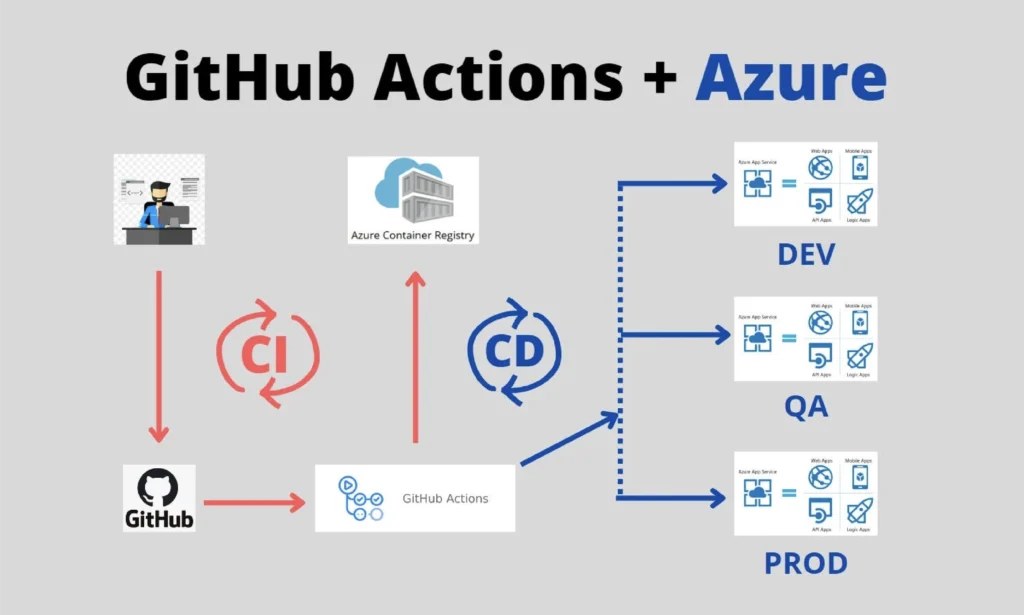
Picture a team that values a collaborative social coding experience like Github yet they also need the reporting and observation provided by Azure DevOps. A potential workflow could include:
- Utilizing a GitHub repository for the main project, allowing contributors to fork and submit pull requests.
- Conducting code reviews, discussions, and automated testing using GitHub Work and GitHub Actions.
- Associating each pull request with work items in Azure Boards, enabling project managers to monitor progress in real time.
- Deploying completed code through Azure Pipelines across multiple environments.
- Storing reusable packages in Azure Artifacts for efficiency and consistency.
- Ensuring quality assurance with Azure Test Plans prior to release.
- Monitoring live application performance via Azure Monitor and receiving alerts in case of anomalies.
- Deploying marketing landing pages via GitHub Pages for rapid time-to-market initiatives.
This workflow is an example of collaboration as opposed to competition, empowering teams to take advantage of the strengths of both platforms in a seamless manner. GKM IT has been able to implement such blended workflows successfully for clients, providing both efficiency and transparency.
Chapter Six: Why the Debate Still Matters
Microsoft owns GitHub and Azure DevOps. So why wouldn’t they be fully merged? Mainly because the target audience and workflow philosophy is different:
- Azure DevOps was designed for enterprise scale organizations that care about governance, compliance, and predictability.
- GitHub cares about speed, transparency, and community.
Within the developer community, GitHub vs GitLab discussion continues, while Azure DevOps continues to dominate the enterprise space where traceability and integration with Azure Cloud services is paramount. At GKM IT we help organizations understand their objectives, team culture, and compliance needs to find the right balance of using these platforms.
Chapter Seven: The Future of Development Platforms
In the near future, we will continue to see the boundary between GitHub and Azure DevOps blur. Expect richer CI/CD integration, relaxed project visibility across both platforms, and perhaps even unified dashboards that reduce the question of Azure DevOps vs GitHub to less of a “which” question and more about “how do we best use both?”
Azure Monitor will likely become more easily visible from GitHub workflows. Azure Artifacts may gain tight integration with GitHub. And Azure Boards may very well be the immediate choice for teams managing large-scale open-source projects.
Chapter Eight: Choosing Your Side (Or Not)

So how do you choose?
If you’re managing an open-source project, you want a broad reach in your community, or you need an extremely lightweight project management layer, your best bet is GitHub with GitHub Pages, a GitHub repository, and collaborative GitHub Work.
If you’re delivering mission-critical software with stringent compliance requirements, then Azure Boards, Azure Repos, Azure Pipelines, Azure Test Plans, Azure Artifacts, and Azure Monitor are as good as they’ll get.
Or, you take the hybrid option. Many teams start with GitHub and use Azure DevOps for all the stages where it excels.
Final Words
Ultimately, Azure DevOps vs GitHub is not so much a competition as it is a collaboration. They are, after all, two sides of the same coin: each is effective in their own areas but not particularly great in areas where the other excels. Use one, use both; it does not really matter as long as you are choosing the workflow that makes your team faster, your code cleaner, and your releases smoother.
And just a reminder: in software development the real competition is not between any platforms; it is between your team and the next missed deadline. Choose wisely. With GKM IT as your technology partner, you’ll always have the tools, integrations, and strategies to stay ahead of that deadline.
Related Blogs:-
DevOps – Yes, It’s All About Driving Business Growth
Complete HIPAA Compliance Checklist for Your Software Product


